Most product work is contextual
Most evaluations of AI design capability run on isolated prompts: design a settings page, build a pricing table, create a sign-up flow. The agent starts in an empty editor, and the result is judged on its own.
Product teams rarely build products from scratch. Most of their work involves enhancing an existing product, and they expect their coding agent to build a coherent experience that sits well with established conventions, design system, and code architecture.
So that is what PX-bench tests. Each test scenario requires the agent to build a feature in the codebase of a complete, opinionated app. We call that app the host app.
Two evaluation criteria for contextual product work
In PX-bench, we classify product-experience capability into eight categories.
Two of the categories can only be evaluated in a context-rich app environment.
Product fit asks whether a feature lands in the right place in the product: the right container, the right entry point, one consolidated surface instead of three scattered ones.
Convention adherence asks whether the agent built the way the app already builds, reusing its components and tokens and matching how it names and formats things.
Neither can be evaluated in silo. "Does this fit?" needs something to fit into; "does this match?" needs conventions to match. That is why PX-bench tests inside an existing app.
Introducing a host app to support contextual evaluation
A host app is a complete, opinionated, multi-screen application with its own component library, design tokens, and code patterns, plus the small idiosyncrasies real products pick up. It has several ways to view its data, empty states, loading states, error states, keyboard shortcuts, a command palette, and a responsive layout.
We build held-out host apps in-house to guarantee the code is not part of the agent's training data. While we don't publish the apps, we build them just like production-ready apps, conventions and idiosyncrasies included.
We design each host app as a genuine product in its own right, never reverse-engineered to fit the rubric. This allows us to measure whether an agent can read an unfamiliar codebase, learn how it works, and extend it effectively, just like it would be required to do in real product work.
Example in-app evaluation
Our first host app is a task tracker: list, board, and calendar views; filtering, sorting, and grouping; a command palette; the usual furniture of a real productivity tool.
The first scenario asks the agent to add saved views: let a user name the current filter-and-sort setup, switch between saved ones, and edit or delete them.
The brief reads like a normal product ticket. What it deliberately does not do is tell the agent how to build any of it.
The task requires the agent to make two decisions that are highly contextual:
Where does the editor live? The brief asks for a way to create and edit a saved view. It never says whether that should be a modal, a drawer, a separate page, or an inline form. On a blank canvas, several of those are defensible and there is no way to be wrong. In this app, creating and editing a task already opens a right-side drawer. So a saved-view editor that opens as a modal is the weaker answer. Modals are fine in general. Here the app already settled how "create and edit" looks, and a modal breaks from it. The right call requires reading the app. That is Product fit, and here one answer is clearly better, precisely because the app exists.
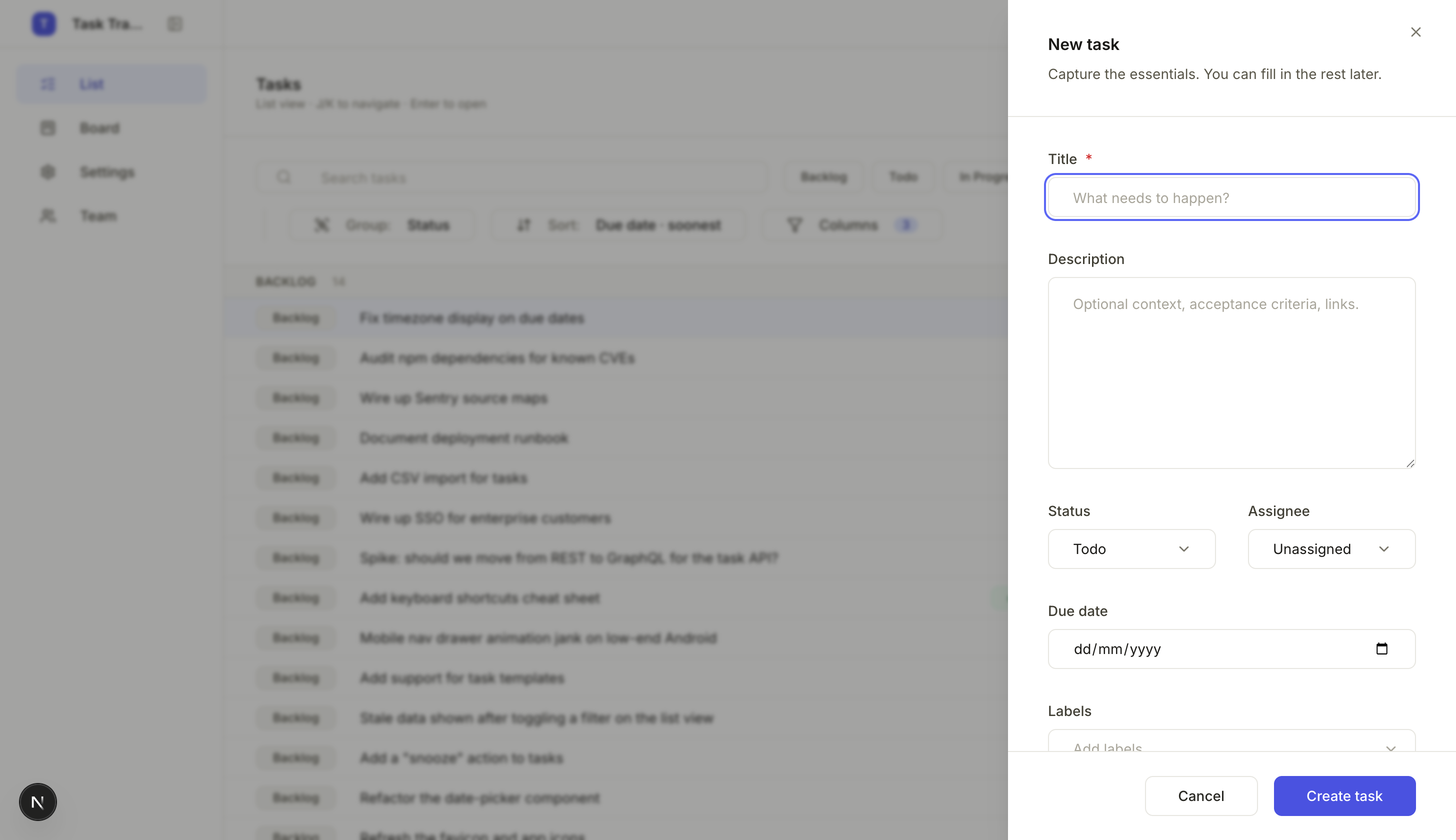
The existing create-and-edit pattern is a right-side drawer. The brief never names a container; the app already did.
Where do saved views live? This one runs deeper. The app already remembers the current view (your active filters, sort, grouping, columns) by writing it to the browser's local storage. An agent reading the code finds that pattern quickly, and the tempting move is to extend it: saved views are just more view state, so store them the same way. That move fails on Intent fidelity, the test of whether the agent built what the brief asked for. The brief wants views that belong to the user's account and follow them across devices, so local storage is the wrong home for them.
A saved view is a named, persisted entity that belongs on the server, alongside the app's tasks, through the same data layer the app already uses for everything account-bound. Telling the local vs account-bound storage patterns apart requires reading the existing code, recognizing two distinct patterns already in it, and judging which to reuse and which to deliberately set aside.

Two patterns already in the codebase, for two different jobs: the current view stays in local storage, a saved view follows the user to the server.
Evaluating agent decisions based on a contextless prompt will not surface these failure modes. Without an app substrate there is no existing drawer to match and no local-storage pattern to be tempted by.
The failures context reveals
The example above highlights the types of questions that can only be answered with supporting app context:
- Does the feature fit the structure? The saved-view editor had a right container to find and an existing create flow to reuse.
- Did the agent honor the conventions or reinvent them? Did it reach for the component that already exists and match the app's naming and style, or did it write reasonable-in-isolation code that quietly drifts from everything around it?
- Did the agent carry the feature through every surface it touches? A complete Saved views feature requires extending the filter bar, every view type, and the command palette. Did the agent extend all of them, or just the one in front of it?
There is also a quieter signal worth naming. A host app with an ad-hoc design system (one the agent hasn't seen a thousand times) tests whether an agent can absorb a customer's house style and implementation patterns, not just pattern-match to a popular design system it has memorized.
Expanding the evaluation
We're working on expanding the evaluation capabilities, starting with adding test scenarios, and scoring multiple agents on each.
We'll also be introducing additional apps, varying a single axis in each: the design system (built in-house versus a familiar library), the domain (an over-represented one like task tracking versus something models see far less of), the flavor of the conventions. Each variation lets us answer a unique set of questions about agent behavior in different real-world scenarios.
June 3, 2026. Reach us at hello@chordio.com.